Tidy Nest
One click sorts your inventory, chests, barrels and shulker boxes. Gear first, best and least worn first, then blocks, food and materials.
- Made for
- Minecraft Java Edition (Fabric)
- Type
- Mod
- Status
- Released
- Latest version
- 1.0.0, released
What it does
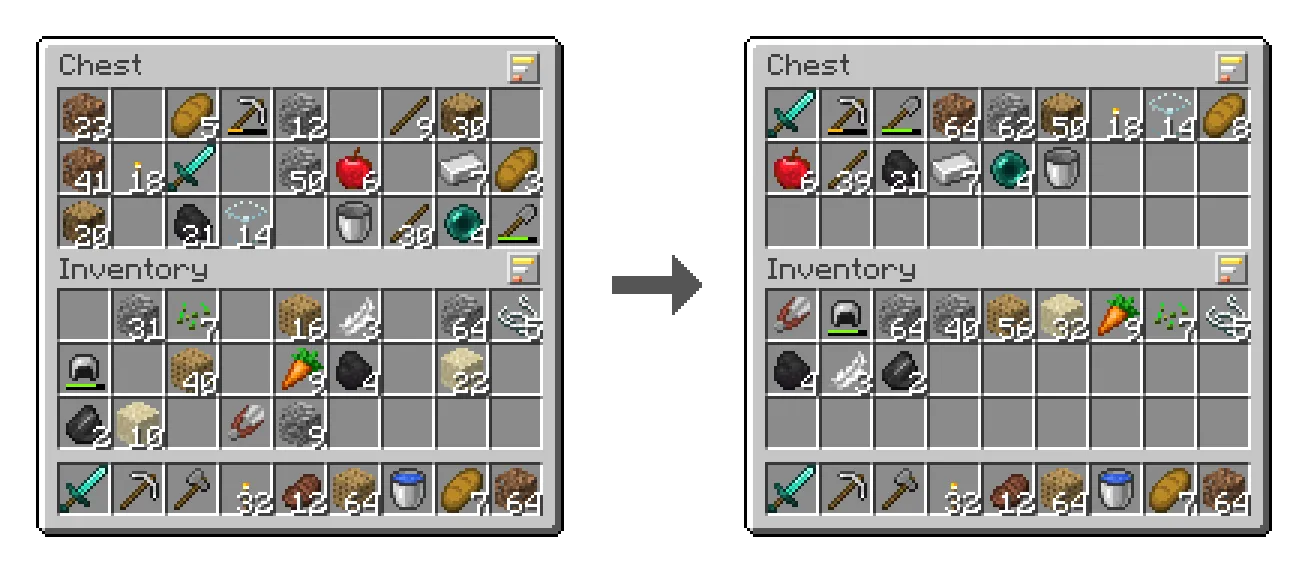
Open a chest or your inventory and you’ll see a small button with three bars above each grid. Click it and that grid is sorted. No menus, nothing to set up.
- Stacks are merged, and the item you have most of comes first, biggest stacks first.
- Gear comes first, best first: weapons and tools by type with the best material and least worn first, then armour head to feet, then shields and other gear.
- Then blocks, food and potions, materials, other items, and shulker boxes and bundles last.
- Your hotbar, armour and off hand never move.
- Shortcuts: double-click an empty slot or middle-click any slot to sort its grid.
- Works on any server. With Tidy Nest on the server the server sorts in one step; without it, your game does the same with ordinary clicks and stops safely if anything doesn’t match.
Works with your inventory, chests, double chests, barrels, ender chests, chest minecarts and boats, and shulker boxes.
Installing
Put tidynest-<version>.jar and Fabric API in your mods folder. On servers it’s optional. Every release is signed, and the included Windows updater only installs signed jars.
In game

Not an official Minecraft product. Not approved by or associated with Mojang or Microsoft.